大模型
x.com ·
@FinanceYF5
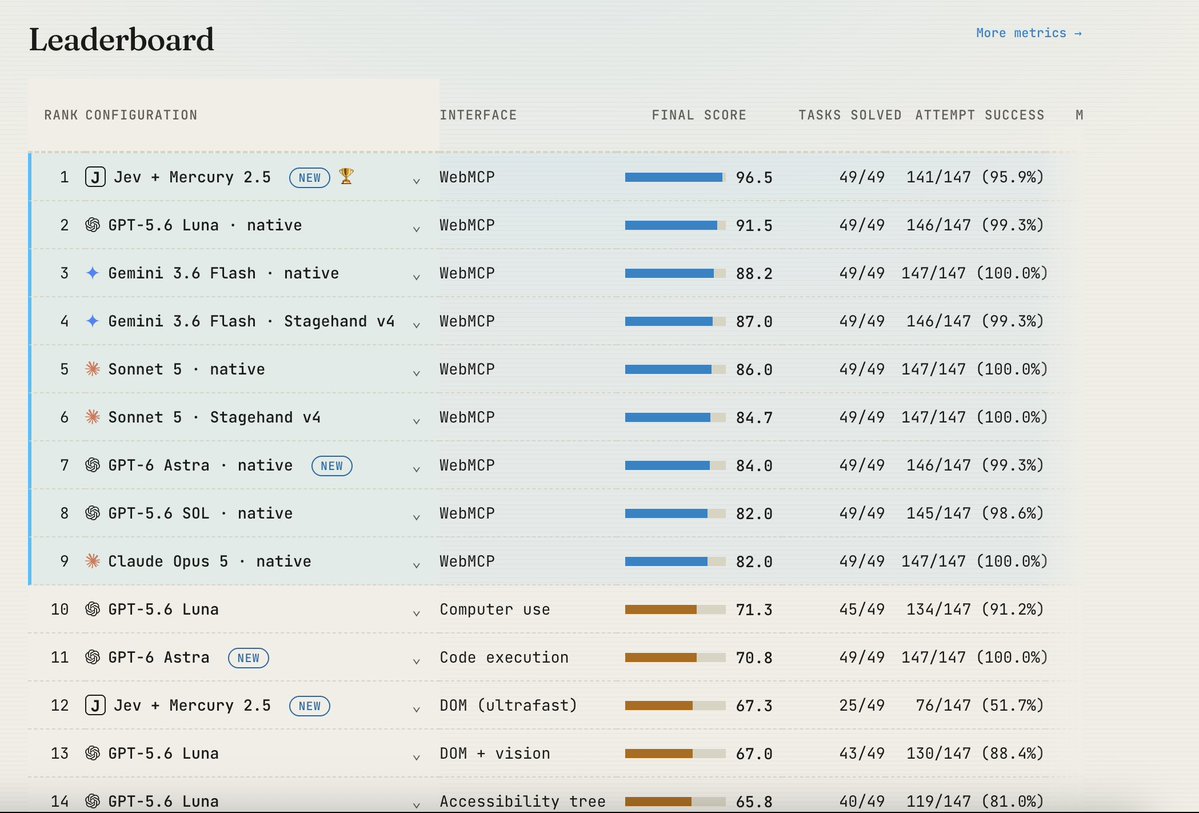
Jev + WebMCP 在 WebMCP 基准上解出全部 49 项任务,模型成本大幅低于 GPT-6 Astra
转引 idan levin 的帖子称,Jev 搭配低成本快速模型 Mercury 2.5 使用 WebMCP 在 WebMCP 基准上解出 100% 任务,模型成本约为使用代码执行的 GPT-6 Astra 的 1/112,约为基于截图的计算机使用方式的 1/245。单独使用 Jev 控制浏览器时仅解出 25/49 任务,加入 WebMCP 后提升至 49/49,模型成本下降 18%。方案为 Jev 负责工具选择、Mercury 生成参数、WebMCP 提供接口,基准与方法论称已开源可复现。
AI推荐理由 转引 idan levin 关于 Jev + WebMCP 在 WebMCP 基准上的结果,含具体任务数(25/49 提升至 49/49)、成本对比倍数与开源可复现说明,对 Agent 浏览器控制与工具调用有实际参考价值;但为二手转述,且 GPT-6 Astra、Mercury 2.5 等对比对象与基准细节需以原始来源核实。
62
浏览 344
点赞 0
评论 0
转发 0
正文
阅读原文
[x.com/0xidanlevin/st…](https://x.com/0xidanlevin/status/2100937437325205568)

idan levin@0xidanlevin
We just ran Jev on our WebMCP benchmark.
The result: basically broke the benchmark.
Jev + Mercury 2.5 (a fast, low-cost LLM) using WebMCP solved 100% of the tasks at roughly 112× lower model cost than GPT-6 Astra using computer use with code execution. Compared to Astra using screenshot-based computer use, the model cost was 245× lower (!).
We also compared Jev operating the browser with and without WebMCP.
We used Browser Use’s open-source Ultrafast, with some improvements to the harness to make it more reliable across the benchmark.
Jev’s browser-control accuracy on its own was not amazing - adding WebMCP nearly doubled the number of solved tasks, from 25/49 to 49/49, while reducing model cost by 18% (more on why below).
The benchmark and methodology are fully open and reproducible.
Full results: [webmcp.com/benchmark](https://webmcp.com/benchmark)
A few words on how the Jev + WebMCP harness works and why this is exciting:
Jev receives text as input and a set of discrete options it can choose from. With WebMCP, those options are the tools exposed by the website. At each step, Jev sees the task, the available tools and previous results, then picks what to do next.
The limitation is that Jev can’t generate arbitrary text, which you need for tool arguments. For example, it can choose the search\_products tool, but it can’t generate the search query itself.
So we split the work: Jev picks the tool and Mercury 2.5 generates the arguments if needed.
This works well because turns out most of the cognitive load in these tasks is around choosing the right action. The argument generation itself is relatively simple, so we can delegate to a small and very fast model. We used Mercury, which outputs 1,000+ tokens/sec and is very cheap.
The result is a pretty simple combination: Jev for tool selection + Mercury for arguments + WebMCP for the interface. It ends up being very reliable, very fast, and very cheap.
A few words about Ultrafast and why do we think it underperforms:
Without WebMCP, Jev chooses from the page’s controls: which button to click, which field to fill, or which option to select.
But choosing a valid button is different from choosing the right next step. The agent still has to navigate menus, understand forms, recover from errors and recognize when the task is actually complete.
Our hypothesis is that WebMCP makes the decision space much simpler. Instead of figuring out a sequence of clicks through a website, Jev chooses explicit actions that directly advance the task.
[@typesafeai](https://x.com/typesafeai) itself documents weaker accuracy on questions requiring multiple reasoning steps. WebMCP moves much of that complexity into the website’s tools, leaving Jev with clearer decisions and fewer opportunities to go wrong (in a sense WebMCP "compresses" a sequence of clicks into one tool call).
Our modified Ultrafast setup solved 25/49 tasks - that is a result for our particular implementation and benchmark, not a universal limit on Jev or Browser Use. We are open to more harness optimization to get this result to perform better, feel free to directly contribute to the benchmark here: [github.com/nekuda-ai/Wind…](https://github.com/nekuda-ai/WindTunnel)
Browser-use ultrafast: [github.com/browser-use/je…](https://github.com/browser-use/jev-ultrafast)
[🔗 View Quoted Tweet](https://x.com/0xidanlevin/status/2100937437325205568)